
.png)
Catch the replay: https://www.youtube.com/watch?v=unD1Yig5G_c&list=PLhQLE6mAxRbiWkeu98c3Os4QxhUzX1BYU
AI adoption often starts with a simple question:
Which model should we use?
But that question only looks at one layer of the problem.
A model can generate text, analyze information, and answer questions. Real business value begins when that intelligence is connected to workflows, tools, company knowledge, and the systems where work actually happens.
That was the focus of The Map, the first session in the DaCodes AI Leadership Series: understanding how Claude Code, Cowork, MCP, Skills, and CLAUDE.md fit together as one connected ecosystem.
Here are the most important takeaways from the session.
1. Claude Code is not just an autocomplete tool
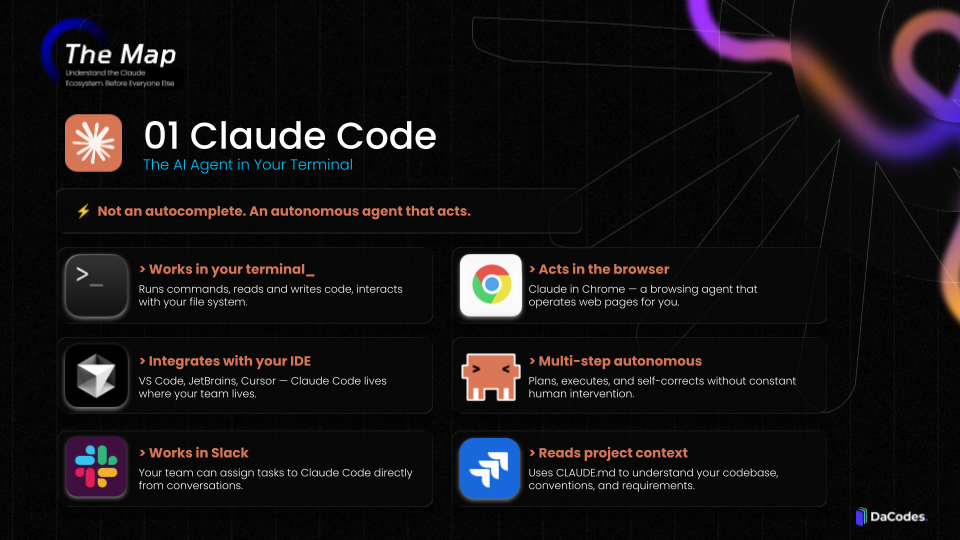
Many development teams first encounter AI through coding assistants that suggest the next line of code.
Claude Code works differently.
Instead of waiting for a developer to guide every step, it can work through a task using an agent loop:
Plan → Execute → Check → Correct → Repeat
Depending on the permissions and tools available, Claude Code can read and write files, run commands, test code, identify errors, make corrections, call APIs, and interact with repositories.
As Eric Segovia, VP of Engineering at DaCodes, explained:
“Instead of just telling you what to do, Claude Code can go and do it.”
That distinction matters.
A traditional assistant helps someone perform the work. An agent can take responsibility for part of the process and continue working toward an outcome.
2. AI agents do not stop at the first answer
A chatbot normally follows a simple pattern:
> You ask a question.
> It returns an answer.
> The interaction ends.
An AI agent can move through a task in multiple steps.
It creates a plan, takes action, checks the result, corrects mistakes, and continues until the task is completed—or until it reaches a point where it needs more information, permission, or human judgment.
Eric summarized the process during the webinar:
“You give it a task, it plans the work, executes it, checks its results, fixes its errors, and keeps going until the task is done.”
This is what makes the agent loop so important.
The value is not only in generating a better answer. It is in reducing the number of manual steps required to reach the result.
3. Cowork brings agentic work to non-technical teams
.png?width=960&height=540&name=webinar01_dacodes_THE_MAP_EN_v2%20(1).png)
Claude Code is built for environments where developers already work, such as terminals, repositories, and IDEs.
Cowork brings similar agentic capabilities to people who do not work in those environments.
Instead of entering commands, users can select folders, provide files, and describe the result they need in plain language.
For example, Cowork can help teams:
- Review contracts and identify renewal clauses
- Analyze reports and create summaries
- Clean and organize spreadsheets
- Build presentation drafts from existing documents
- Compare information across multiple files
- Support recurring operational workflows
This makes agentic work relevant beyond Engineering.
Legal, Marketing, Finance, Operations, and other business teams can delegate complex, file-based tasks without writing code.
The interface changes. The underlying idea remains the same: Claude works through the task rather than simply describing how someone else should complete it.
4. MCP connects Claude to the systems where work happens
.png?width=960&height=540&name=webinar01_dacodes_THE_MAP_EN_v2%20(2).png)
An AI assistant can be highly capable and still remain disconnected from the business.
The real work usually lives somewhere else:
- Google Drive
- Slack
- Databases
- CRMs
- ERPs
- Internal platforms
- External APIs
The Model Context Protocol, or MCP, provides a standardized connectivity layer between Claude and those systems.
Without MCP, Claude may be able to explain what should happen.
With MCP, it can potentially retrieve the relevant information, interact with the appropriate tool, and participate in the workflow.
As Eric noted:
“Most AI pilots stay disconnected from the tools where the real work happens. That’s the problem MCP solves.”
This is one reason many AI pilots fail to move beyond experimentation. They remain outside the systems that employees use every day.
Connectivity is what turns an isolated AI experience into an operational one.
5. Read and write access should be designed deliberately
Connecting an AI agent to a system does not mean giving it unlimited control.
Access can be designed at different levels.
Read accessClaude can search and analyze information without changing the source system. This may be appropriate for tasks such as: > Research> Document analysis > Reporting > Data validation > Internal knowledge retrieval |
Write accessClaude can create, update, or trigger actions inside a connected system. This may include: > Creating a document> Updating a CRM record > Drafting an email > Starting a workflow > Adding information to an internal platform |
A useful AI workflow is not simply the one with the most autonomy. It is the one with the right balance between execution, control, and oversight.
6. Human approval remains part of strong agentic workflows
Autonomous does not mean unsupervised.
Companies still need to define:
- What the agent can access
- Which actions it can perform
- Which decisions require approval
- What should be logged
- When a task should be escalated
- Where human judgment must remain involved
For example, an agent may analyze contracts, identify deadlines, and draft a message to Legal. But a person may still need to verify the findings and approve the final communication.
This approach allows teams to automate repetitive work while preserving control over high-impact decisions.
The goal is not to remove humans from every workflow.
The goal is to use human attention where it creates the most value.
7. Skills turn general AI into specialized AI
.png?width=960&height=540&name=webinar01_dacodes_THE_MAP_EN_v2%20(3).png)
Out of the box, a model is a generalist.
It may understand common terminology and broad industry concepts, but it does not automatically know how a specific company writes proposals, reviews contracts, structures reports, or applies internal policies.
Skills package that knowledge into reusable instructions and supporting materials.
A Skill can include:
- Templates
- Examples
- Checklists
- Formatting rules
- Process instructions
- Domain terminology
- Quality standards
- Actions to avoid
Instead of explaining the same requirements in every conversation, the organization writes them down once and reuses them.
This helps teams produce more consistent outputs and reduces the variation caused by different people writing different prompts.
Skills are not simply prompt shortcuts.
They are a way to transform institutional knowledge into something an AI agent can apply repeatedly.
8. CLAUDE.md gives Claude persistent project context
.png?width=960&height=540&name=webinar01_dacodes_THE_MAP_EN_v2%20(4).png)
Technical teams often spend time repeating the same project information:
- Which stack is being used
- How the codebase is structured
- What naming conventions should be followed
- Which testing standards apply
- How deployment works
- Which actions are restricted
A CLAUDE.md file stores that context inside the repository.
When Claude Code begins working, it can start with an understanding of the project’s rules and requirements.
Eric explained the impact this way:
“Every interaction with your codebase already knows the rules. A new hire can be productive from day one, and even a brand-new session starts with full context.”
This reduces repeated prompting and helps create more consistent work across sessions.
A small context file can make a significant difference because the agent does not have to start from zero every time.
9. The ecosystem matters more than the model alone
Model comparisons receive a great deal of attention.
Benchmarks change. Rankings move. New releases appear constantly.
But in a business environment, the model is only one part of the architecture.
The surrounding ecosystem determines whether the intelligence can become useful inside the organization.
That ecosystem includes:
- Context
- Tools
- Integrations
- Workflows
- Permissions
- Reusable knowledge
- Human review
- Execution capabilities
Alejandro Hynds, Head of US Sales at DaCodes, captured this idea during the session:
“The models may be comparable. What has made the difference for me is everything built around the LLM: the tools that automate tasks and give it context.”
The long-term advantage does not come only from choosing a strong model.
It comes from designing the system around it.
10. The best AI use cases begin with real operational friction
Companies often begin AI initiatives by searching for the most innovative or impressive idea.
A better starting point is usually much more practical.
Look for a workflow that is:
- Repetitive
- High-volume
- Rule-driven
- Connected to multiple systems
- Dependent on manual handoffs
- Painful enough that employees already complain about it
These workflows are often better candidates because the business value is easier to identify and measure.
A successful first use case might reduce review time, eliminate repetitive data entry, accelerate approvals, improve response times, or remove a recurring operational bottleneck.
Carlos Vela, CEO and Co-founder of DaCodes, emphasized the importance of production use cases during the webinar:
“We implement Claude for real enterprises. Not demos, not experiments—production systems that teams use every day.”
The goal should not be to prove that AI can do something interesting.
The goal should be to improve how the business operates.
From chat to workflow
The biggest shift in enterprise AI is not simply moving from one model to another.
It is moving from isolated conversations to connected workflows.
A basic AI interaction looks like this:
Ask → Receive an answer → Complete the work manually
An agentic workflow can look more like this:
Define the objective → Retrieve context → Take action → Check the result → Request approval → Update the system
That is the larger picture behind the Claude ecosystem.
- Claude Code and Cowork provide environments where work can happen.
- The agent loop enables multi-step execution.
- MCP connects Claude to external systems.
- Skills provide reusable domain expertise.
CLAUDE.mdsupplies persistent project context.- Governance and human review keep the workflow controlled.
These are not isolated features.
They are layers of one architecture.
The main takeaway
The model matters.
But the model alone is not the strategy.
Real value comes from connecting intelligence to the context, systems, workflows, and knowledge that already exist inside the company.
Companies that understand this will move beyond one-off prompts and disconnected pilots.
They will begin designing AI as part of how work actually gets done.
Want to explore the full Claude ecosystem?
The Map is the first session in the DaCodes AI Leadership Series, a five-part series designed to help leaders understand, evaluate, and implement Claude across their organizations.
Upcoming sessions will explore Claude Code, MCP, Skills, organization-wide adoption, and a practical 90-day implementation roadmap.
Follow DaCodes to access the next session and continue building the map.